


For a nonprofit, an event can be more than just a date on a calendar. It can involve donations, volunteers, attendance, communication, follow-up, reporting, and Gift Aid. When these activities sit across separate platforms and spreadsheets, the event may finish while useful data remains fragmented.
The bigger question is not simply how to host an event, but how to structure its data. A well-designed Salesforce environment can connect attendance, registration, supporter engagement and fundraising and also allows teams to manage the event as part of the wider constituent journey.
For UK charities, reliable data matters at scale. The Charity Commission has reported that charities in Wales and England recorded £102 billion in income in 2024, while impact spending reached £100 billion. These are the figures that cover the wider sector instead of events specifically.
What Does Salesforce Event Management Mean?
Salesforce event management is basically the process of structuring an event, including its participants, activities, and resulting interactions within the CRM. The exact data architecture depends on whether your organisation operates on the legacy Nonprofit Success Pack (NPSP), the updated Agentforce Nonprofit (formerly Nonprofit Cloud), standard core Sales or Service Cloud, or a native AppExchange event package.
A useful structure starts with the event itself: date, name, venue, capacity, campaign association, and event type. Registration can then connect people to that event, while additional records capture attendance, payment status, ticket type, follow-up, and volunteer roles.
This structure becomes especially useful when an attendee already exists in Salesforce. Instead of creating another contact because someone registered for a fundraising dinner, the registration can connect to their existing volunteering and communication history, preserving previous giving and constituent records. For nonprofits using separate registration, payment, or fundraising platforms, Salesforce integration services can also help connect these systems and keep event data synchronised with the wider CRM.
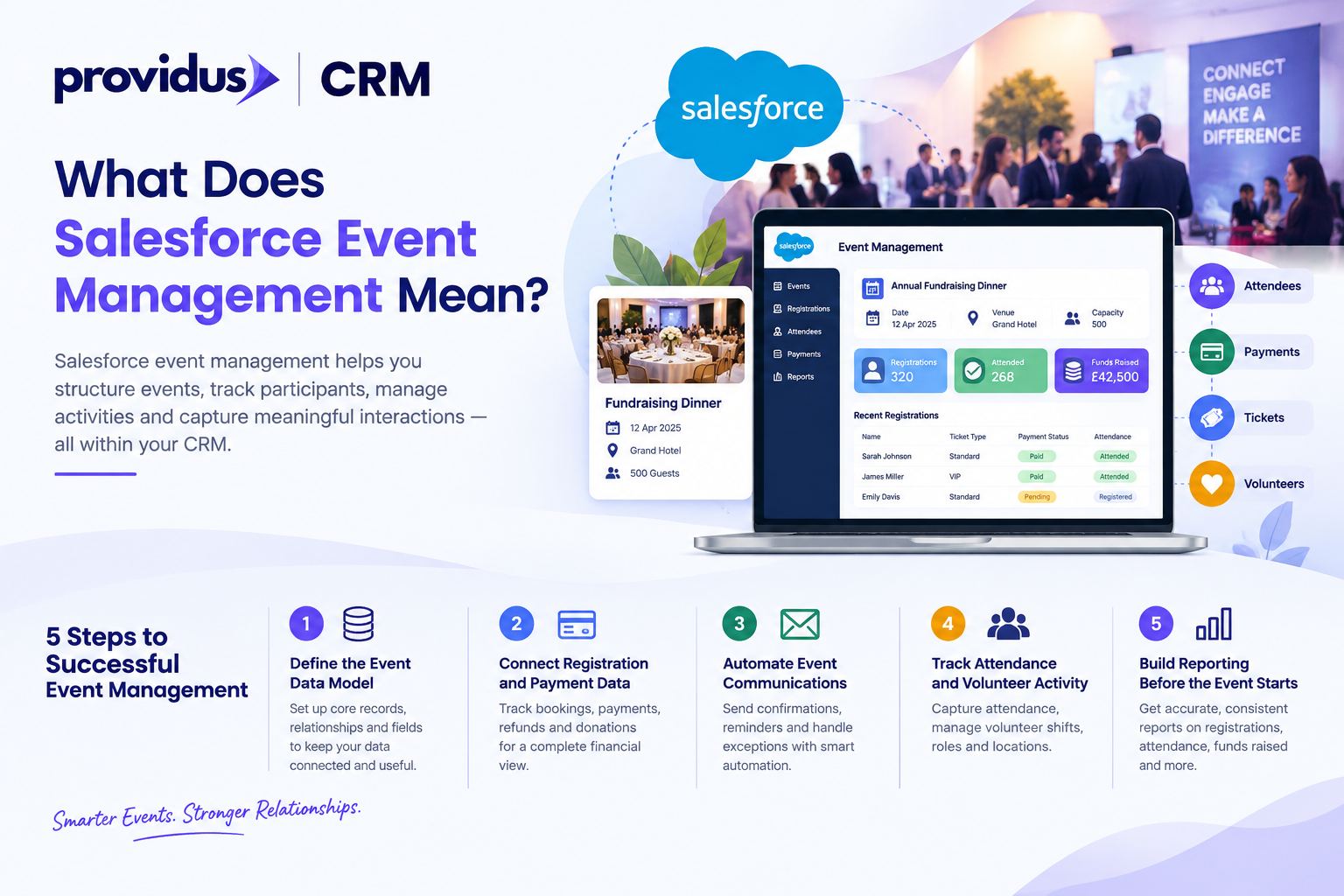
Step 1: Define the Event Data Model
The first technical step is deciding what information Salesforce must store and how the records are connected to one another. Without this design, useful information can become difficult to automate, reconcile, and report later.
Define the core records and relationships, including constituent, registration, event, ticket or participant type, payment, campaign, and attendance. After this, decide which fields are mandatory, which values should use controlled picklists, and which relationships require automation.
For instance, a supporter may register for a fundraising dinner, purchase a £50 ticket, attend, or even make it later to make a £250 donation. When all these actions are connected, the fundraising team can easily understand the journey even without joining information from different spreadsheets.
Step 2: Connect Registration and Payment Data
Registration is only one part of the event lifecycle. A nonprofit also needs to understand whether a place was reserved, whether a separate donation was made, whether payment succeeded, and whether further processing is required.
A properly designed Salesforce event management setup should explain the relationship between financial records and registration. This also allows teams to distinguish between an attendee who registered but did not pay, an attendee who made an additional donation, and a paid ticket.
The wider fundraising environment also explains why accurate financial records matter. HMRC has reported that £4.7 billion of donations have been claimed through self-assessment for the tax year that ends in April 2025. This is the figure that covers qualifying donations generally instead of event fundraising specifically, but it reinforces the importance of maintaining accurate donation data.
Step 3: Automate Event Communications
Once registration data is structured, automation can easily reduce repetitive administration. A registration can mainly trigger confirmation, while reminders can be scheduled according to attendee status, event date, or ticket type.
Automation can also handle exceptions. A cancelled registration can update the status of participant and also prevent irrelevant reminders moreover, a failed payment can trigger afollow-up rather than requiring staff to mainly identify the issue manually.
The key is actually to automate defined processes instead of every possible action. Poorly designed automation can create incorrect status changes or duplicate messages, so each of the process should have conditions, a clear trigger, action, and exception path.
Step 4: Track Attendance and Volunteer Activity
Registration does not prove attendance. For multiple nonprofits, this distinction matters the most because attendance can influence volunteer records, support engagements, program reporting, and future communications.
Salesforce event management can easily carry the process from registration into attendance and also volunteer tracking. Attendance can be associated with the relevant event or participant, creating an engagement history that can later support reporting and segmentation.
Volunteer activity might require different information from ordinary attendance. A volunteer might have a shift, responsibility, and location, while a guest may only need a ticket and check-in status. Capabilities of Salesforce Nonprofit support volunteer activities, shifts, roles, location, capacity planning, and attendance tracking.
Step 5: Build Reporting Before the Event Starts
Reporting should not be treated as the final task. You should decide before launch which questions Salesforce needs to answer and also design the data accordingly.
Useful reports can include registrations by paid versus unpaid places, event type, attendance rate, cancellation rate, volunteer participation, funds raised, and also post-event donations. A dashboard can bring these measures together for the operational leadership and teams.
The technical principle is simple: reportable information needs consistent data. If one campaign uses “Attended,” another uses “Present” and a third leaves the field black, the dashboard could not reliably calculate attendance. Furthermore, Standardised values and validation rules are more essential than a visually impressive dashboard.
Where Does Salesforce Event Management Become More Complex?
Complexity increases when an event involves multiple capacity rules, ticket types, volunteers, payment gateways, recurring communication, hybrid attendance, or even several related campaigns. This is the point where standard configuration might need to work alongside an integration or specialist event application.
When native core objects are insufficient, Salesforce AppExchange provides native, zero-middleware applications such as Blackthorn Events. Operating directly on custom Salesforce objects, these tools manage complex ticketing, badge scanning, mobile check-in, and payment processing without creating external data silos. This appropriate architecture should also depend on the requirements organisation instead simple the number of features offered.
The important technical question is basically where the system of record should sit. If registration data exists in one platform, while supporter information sits in another, statuses and transactions, integrations must synchronise identities. Furthermore, a well-designed architecture should make the event another part of the constituent journey in place of creating an isolated database.
How Should Nonprofits Measure an Event Afterwards?
Post-event reporting should always go beyond counting attendees. A nonprofit should also examine what happened before, during, and after the event.
For instance, teams can compare registrations with attendance, attendance with engagement, and also engagement with later programme activity or fundraising. This does not prove that an event caused a later donation; it also creates connected data that allows the organisation to investigate those relationships accurately.
The same data can also support segmentation. Attendees who volunteered can also receive different communication from first-time ticket purchasers. Regular participants can be identified for future invitations, while people who mainly get registered but did not attend can receive appropriate follow-up.
When Should a Nonprofit Consider Specialist Salesforce Support?
A straightforward event might be manageable with standard Salesforce configuration. Complexity also appears when the organisation needs multiple custom objects, integration, advanced automation, payment processing, complex permissions, or even migration from an existing event platform.
This is the point where implementation decisions matter. A specialist can easily assess the existing data model and also determine whether configuration or even custom development is appropriate, map integrations, and also test the complete event journey before it reaches production.
Structuring complex event data models, payment gateway integrations, and post-event automated journeys requires tailored technical architecture. ProvidusCRM’s certified solution architects partner with UK non-profits to design compliant, scalable Salesforce environments, connecting event registrations directly to donor profiles and fundraising pipelines. Explore our Salesforce Nonprofit Consulting Services to optimize your event technology
Conclusion
Running an event in Salesforce is not only about creating an event record and collecting registrations. The real value comes from attendance, connecting registration, payments, volunteering, communication, and also post-event engagement to reliable constituent data.
A carefully designed Salesforce event management architecture gives a nonprofit a clearer operational picture while reducing manual reconciliation.
Frequently Asked Questions
1. Can Salesforce handle virtual and hybrid nonprofit events?
Yes. Salesforce can store event, registration, and participation data, while integrations or specialist applications can provide virtual-event functionality.
2. Can Salesforce manage event capacity and waitlists?
Yes. Capacity and waitlist processes can be configured, although complex requirements may need custom automation or an event-management application.
3. Can attendees register for more than one nonprofit event?
Yes. A properly designed data model can associate one constituent with multiple event registrations without creating duplicate constituent records.
4. Can event data be migrated from spreadsheets?
Yes. Spreadsheet data can be mapped, cleansed, transformed, and imported into Salesforce, subject to the quality and structure of the source data.
5. Can nonprofits connect event attendance with future communications?
Yes. attendance data can be used as a segmentation or automation input for appropriate follow-up journeys.
