


Every newly provisioned Salesforce org arrives with the default state, a single system administrator profile, standard objects, and no business logic applied. What actually separates an org that supports a growing sales and service organisation from one that is basically abandoned within eighteen months is the discipline applied in the phase of initial setup.
Correct sequencing along with the appropriate governance applied at each stage determines whether the platform becomes accumulated technical debt or durable infrastructure.
This Salesforce configuration guide documents the sequence that a certified Salesforce administrator follows when provisioning an org from a blank state in 2026: the order of operations inside Setup, field-level decisions for objects that carry long-term consequences, and the governance checkpoints required before go-live.
It is written exclusively for technical founders, administrators, and operations leads who require a precise, implementation-grade reference as compared to a general overview. Let’s get started and understand how to customize and configure Salesforce for your business.
What Does Configuring Salesforce Involve?
Customisation and Configuration are frequently conflated, but they are governed by different tooling, typically different skill requirements, and different risk profiles. Configuration mainly refers to changes made using point-and-click tools within Setup, Salesforce's declarative suite, including Object Manager, Page Layout Editor, profiles and permission sets, Validation Rule Editor, sharing settings, and Flow Builder.
No Apex, Lightning Web Component code, or Visualforce is required. Customisation, by contrast, involves Apex classes and triggers, Lightning Web Components, Visualforce pages, or custom API integrations that basically extend functionality beyond what the declarative layer actually supports.
Salesforce's own architecture is completely built on the principle that the majority of business requirements are required to be met declaratively before code is introduced. In practice, most growing organisations can satisfy 70–80% of their operational requirements through configuration alone, reserving Apex development for edge cases that point-and-click tools genuinely cannot address.
This is the core value proposition of any Salesforce CRM configuration engagement. The majority of what determines whether an org functions correctly is a set of disciplined, declarative setup decisions, not custom development spend. It is also a reason why a rigorous Salesforce setup guide carries more weight than most teams initially assume.
The flexibility of the platform is substantial, and without a governed plan, that flexibility produces duplicate fields, unmanageable technical debt within twenty-four months, and conflicting automation.
Getting the knowledge of how to configure Salesforce is, at its core, a sequence of governance decisions implemented through the Setup menu, which roles inherit visibility into which records via role hierarchy and Organisation-Wide Defaults (OWD), which processes warrant automation through Flow Builder, and which fields are strictly necessary on a given page layout.
Approaching the configuration process as governance first and mechanics second materially reduces rework later.
Why Is Configuration Accuracy a Security and Compliance Requirement?
Security researchers at AppOmni have identified more than twenty distinct default behaviours and insecure configurations across Salesforce's low-code Industry Cloud components. It includes Data Mappers, FlexCards, and OmniScript sessions, and also several severe enough that Salesforce issued CVEs to remediate them, as reported by CSO Online.
Moreover, the underlying pattern was not a defect in the Salesforce platform itself, but it originated in customer-side configuration choices, permissive guest user sharing rules, incomplete field-level security, and unreviewed Apex class access.
This is the technical justification for treating how to configure Salesforce as a security discipline from the first Setup session. The org is only as defensible as the permission, sharing, and field-level access decisions made during configuration.
This is specifically why documented best practices of Salesforce configuration function as a formal discipline rather than an informal checklist.
A single overly permissive sharing rule or even an inherited "Modify All Data" permission does not merely generate a support ticket, but it can expose personally identifiable information, contractual data to unauthorised users, or financial records.
Configuration accuracy is not a matter of process aesthetics, but it is a control that determines the org's exposure to risk.
Step-by-Step Process of The Complete Salesforce Setup
The following sequence reflects the order most of the certified administrators apply, whether provisioning a single-cloud org for a ten-person sales team or even a multi-cloud deployment for an enterprise account.
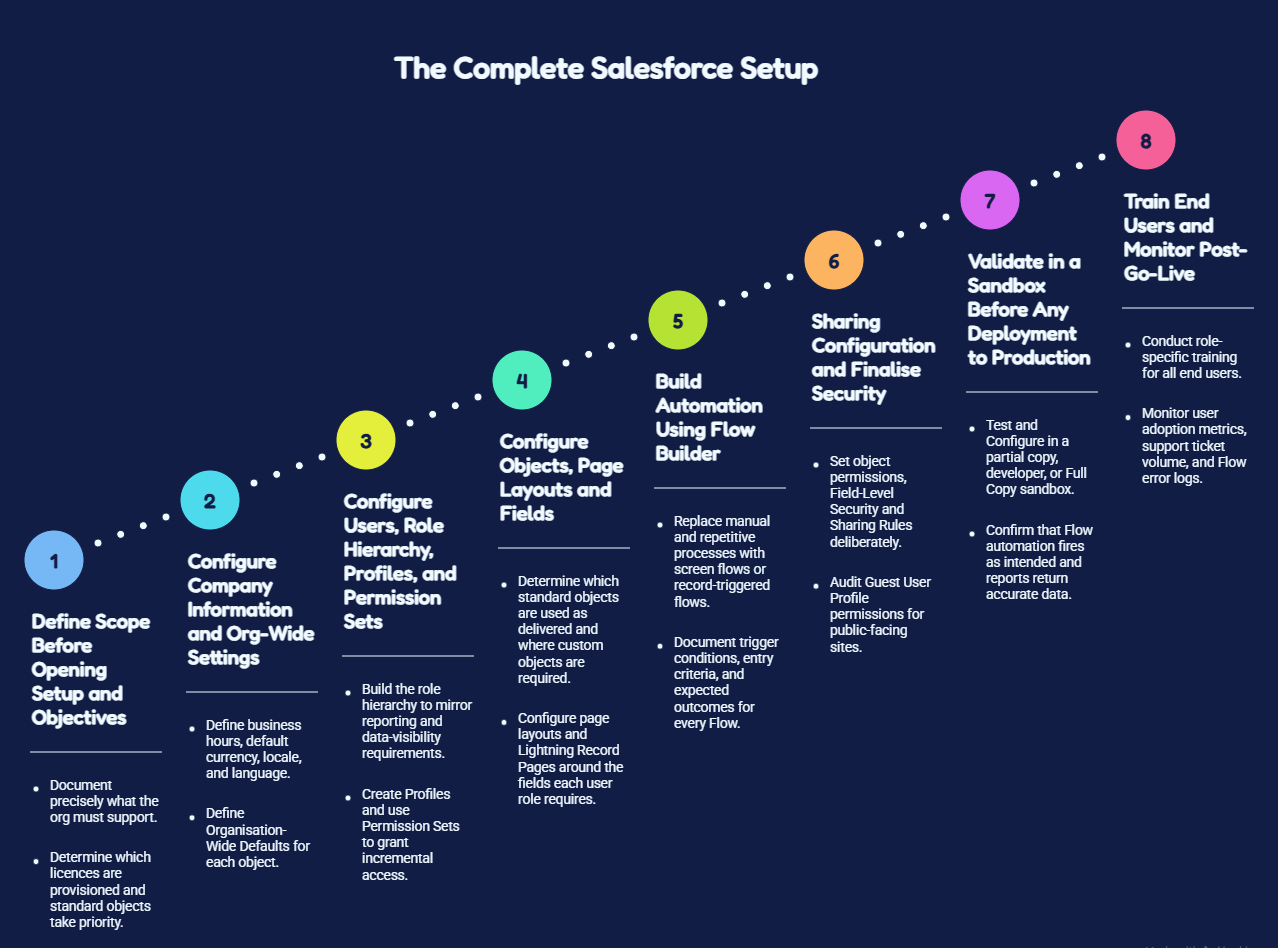
1. Define Scope Before Opening Setup and Objectives
Before any configuration begins, document precisely what the org must support. Pipeline management, case management in Service Cloud, Sales Cloud, campaign and journey execution in Marketing Cloud, or it can be a combination. This decision determines which licences are provisioned, which standard objects take priority, and yes, how subsequent configuration decisions are sequenced.
Skipping this step is the primary reason why Salesforce setup for beginners produces unusable fields, broken automation, and page layouts built against a process that was never formally agreed upon
2. Configure Company Information and Org-Wide Settings
Under Setup > Company Settings, define business hours, default currency, locale, and language. Under Setup to Sharing Settings, define Organisation-Wide Defaults (OWD) for each object: Private, Public Read Only, or Public Read/Write, as the baseline from which role hierarchy and sharing rules actually operate.
These settings propagate through each object that gets configured afterward, so they must be finalised before dependent configuration begins.
3. Configure Users, Role Hierarchy, Profiles, and Permission Sets
Build the role hierarchy under Setup to Roles to mirror the organisation's actual reporting and also data-visibility requirements, not its org chart for its own sake. Create Profiles to control field- level access and baseline objects, and use Permission Sets to grant incremental access without cloning profiles unnecessarily.
This constitutes the core of disciplined Salesforce admin configuration work, and on the other hand, it should never default to assigning the standard System Administrator profile broadly.
4. Configure Objects, Page Layouts and Fields
In Object Manager, determine which standard objects, such as Contact, Account, Opportunity, Case, Lead, are used as delivered, and where the custom objects or even custom fields are genuinely required. Configure page layouts and Lightning Record Pages around the fields each user role requires operationally, applying Field-Level Security to restrict sensitive fields rather than just relying on layout omission alone.
5. Build Automation Using Flow Builder
Replace manual and repetitive processes, lead assignment, follow-up task creation, and approval routing with screen flows or record-triggered flows. Document trigger conditions, entry criteria, and expected outcomes for every Flow at build time. Poorly documented Salesforce configuration steps at this stage are mainly the leading cause of automation conflicts that get discovered months after go-live.
6. Sharing Configuration and Finalise Security
Set object permissions, Field-Level Security and Sharing Rules deliberately, object by object, rather than relying on OWD defaults alone. For any public-facing Experience Cloud site, audit Guest User Profile permissions specifically. This is the exact configuration surface where the misconfigurations referenced above originate.
For UK organisations, configuring object-level access and Field-Level Security (FLS) is a core data governance requirement under UK-GDPR. Restricting unneeded visibility to sensitive Personally Identifiable Information (PII) ensures your data model aligns with the principle of data minimisation and protects your org during internal or third-party compliance audits.
7. Validate in a Sandbox Before Any Deployment to Production
Test and Configure in a partial copy, developer, or Full Copy sandbox before deploying to production. Confirm that Flow automation fires as intended, reports and dashboards return accurate data, and especially no profile or permission set grants unintended visibility.
8. Train End Users and Monitor Post-Go-Live
Technical correctness alone does not guarantee adoption; conduct role-specific training, then monitor user adoption metrics, support ticket volume for a minimum of thirty days following cutover, and Flow error logs.
This Salesforce setup process should be followed sequentially. Skipping ahead to Flow automation before role profiles, hierarchy, and Organisation-Wide Defaults are finalised is the most common source of costly rework identified in post-implementation audits.
Best Practices for Salesforce Admin Configuration for Long-Term Stability
The following practices distinguish an organization that remains maintainable for multiple years from orgs that accumulate unmanageable technical debt:
- Document every configuration decision: Flow logic, Field purpose, and sharing rule rationale must be recorded outside of any single administrator's institutional memory.
- Favour Permission Sets over profile proliferation: Permission Sets are more auditable and eventually scale more predictably as headcount grows.
- Review automation on a fixed quarterly cadence. Flows built for a ten-user org frequently fail silently at one hundred users.
- Maintain a defined sandbox refresh schedule so test environments accurately reflect configuration and production data.
This discipline is increasingly load-bearing. Salesforce Ben's 2026 Admin Survey found that 58.6% of administrators agree that the platform is becoming increasingly complex, and 53.1% report that expectations placed on the role now exceed available resources and time, according to Salesforce Ben.
This rising complexity is precisely why formalised Salesforce configuration best practices, applied consistently from initial setup onward, outperform ad hoc technical workarounds. Understanding the process of how to configure Salesforce correctly today is as much a discipline of documentation and restraint as it is a technical skill set.
In-House Configuration Versus a Certified Salesforce Partner
Single-cloud orgs with narrowly defined requirements can frequently be configured internally using this Salesforce configuration tutorial as a main structural reference, provided a team member has the capacity to master Setup methodically rather than through trial and error. This calculation changes materially once configuration spans multiple clouds and it involves migration from a legacy CRM, or operates within a regulated industry where field-level security and even sharing configuration carry direct compliance implications.
Salesforce retains a substantial CRM market leadership position; IDC has ranked it the number one CRM vendor continuously for the thirteenth consecutive year, with a 20.0% global market share in 2025, as per Salesforce's newsroom, citing IDC.
This scale is the reason why the platform sustains such extensive configurability, and especially why organisations researching how to configure Salesforce for complex, multi-cloud requirements frequently engage certified expertise rather than accept the cost of remediating a flawed configuration eighteen months post-launch.
How ProvidusCRM Approaches Salesforce Configuration?
ProvidusCRM's consultants hold certifications across the Salesforce platforms and also configure each org against documented business processes rather than a generic template.
Every engagement begins with the same objectives-first methodology outlined above and followed by automation, role hierarchy, and security configuration designed to remain stable as the organisation scales, not only at go-live.
Explore our Salesforce consulting services to discuss configuration scope, timeline, and where additional technical support may be warranted.
Conclusion
Understanding how to configure Salesforce correctly requires more than familiarity with Setup menus. It requires disciplined sequencing: objectives and scope first, Organisation-Wide Defaults and role hierarchy second, objects and page layouts third, automation built against a finalised data model fourth, and security configurations validated in a sandbox before any change reaches production.
Furthermore, organisations that follow this sequence produce CRM systems their teams trust and adopt, and organisations that bypass steps typically face reconfiguration within a year.
Frequently Asked Questions
1. How long does a full Salesforce configuration typically take?
A single-cloud configuration with a defined scope typically requires one to three weeks.
2. Is coding required to configure Salesforce?
No, the majority of requirements, fields, objects, page layouts, security settings, and Flow-based automation can be delivered entirely through Salesforce's declarative tools. Apex or Lightning Web Component development becomes necessary only for requirements outside the scope of native configuration.
3. What distinguishes Salesforce configuration from customisation?
Configuration uses Salesforce's native, declarative tools such as Setup, Object Manager, Flow Builder, and Permission Sets. Meanwhile, customisation involves custom code, Apex, Visualforce, or Lightning Web Components to deliver functionality.
4. Should configuration be handled internally or by a certified consultant?
Single-cloud orgs with limited complexity are frequently manageable internally.
5. What is the most consequential configuration error organisations make?
Configuring directly in production without sandbox validation, and then building Flow automation before the underlying data model.
6. How frequently should an existing Salesforce configuration be reviewed?
At minimum, it can be reviewed on a quarterly basis.
