

Support staff often spend more time navigating systems than actually resolving issues. Behind every quick and accurate response lies a Salesforce Service Cloud data model designed to keep customer records, case studies, and support rights in one integrated place.
If this data model isn't implemented correctly, staff will be dealing with stalled issues and missing information, and customers will be repeating their requests across all channels. If implemented correctly, support becomes consistently fast and truly effective.
What Is the Salesforce Service Cloud Data Model?
It's essentially the structured arrangement of fields, objects, and relationships that Salesforce uses to organize everything related to customer support, from a single case to a complete support history.
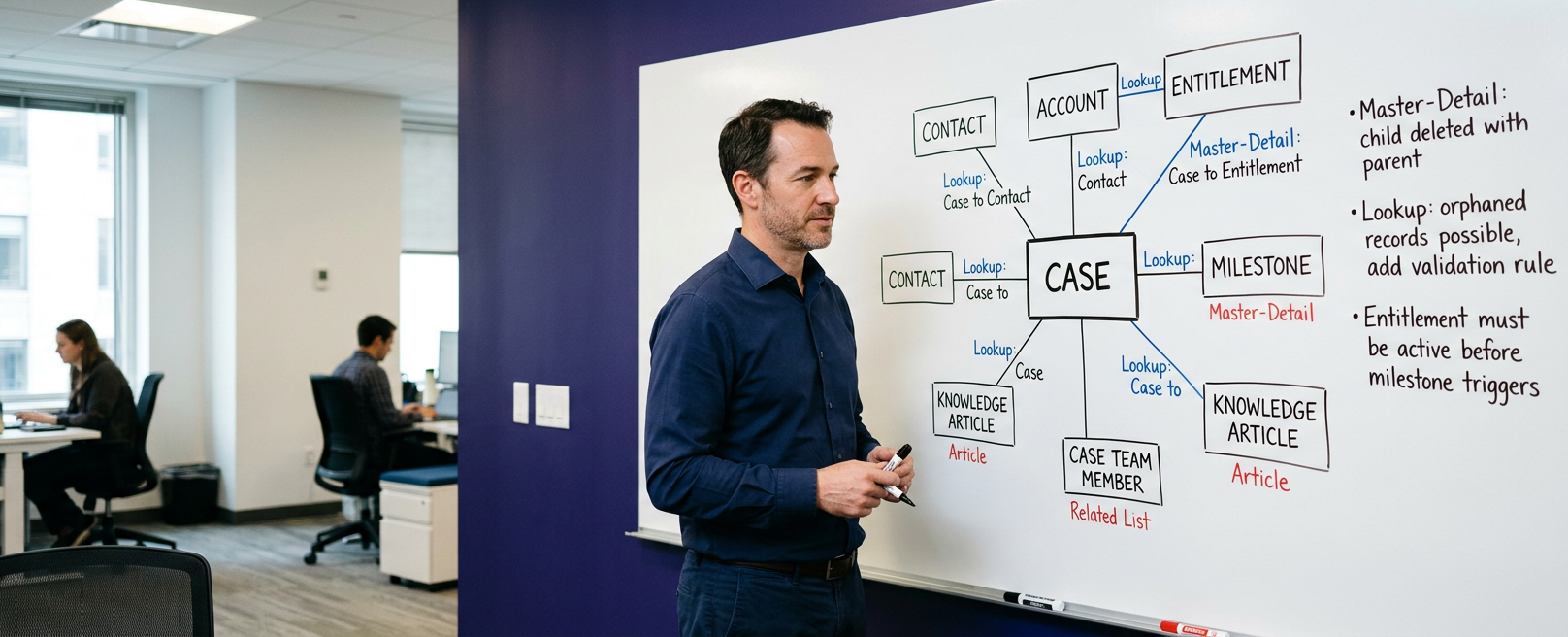
The Case object is at the heart of this model, recording every issue, complaint, and request submitted by the customer. Cases are externally linked to contacts, accounts, permissions, milestones, and knowledge articles, giving employees a comprehensive understanding of the context without ever leaving the screen.
This isn't just a formal structure; every relationship within the model exists to answer a specific operational question, such as what permissions the customer has, who owns the account, and the required response time. Familiarize yourself with this framework before you start configuring it, as the decisions made here impact all the automations, reports, and integrations that will later be built on Service Cloud.
Overview of Salesforce Service Cloud Data Model
The Service Cloud data model is an ecosystem of relational records built around customer history.
Contacts sit beneath the accounts as the individual people who raise cases. Cases sit above both, tying every interaction back to a real person at a real company. Around this core, Salesforce layers service contracts, entitlements, milestones, and Knowledge Articles, and each object adds context agents need in the moment, rather than forcing a search through separate systems.
Explanation of Core Salesforce Service Cloud Objects
Understanding the Salesforce Service Cloud objects that make up this ecosystem is the fastest route towards understanding how the whole platform behaves once real support volume hits it.
- Case: the central record for any customer issue, request, or complaint.
- Account: Stores organisation-level details, including industry, support tier, and contract terms.
- Entitlement: Defines the level of support a customer is owed under contract.
- Milestone: Tracks SLA deadlines, such as first response or resolution time.
- Contact: Represents the individual raising the issue, linked to an Account.
- Knowledge Article: Stores reusable solutions that agents and customers can search.
- Case Team Member: Records which colleagues are collaborating on a complex case.
Every object on this list exists because a real support scenario needs it. Remove any one of them, and agents lose visibility somewhere in between the process, usually at the worst possible moment. The Salesforce Service Cloud data model only works when these objects are fully configured to reflect how your team actually operates, not a generic template borrowed from another industry.
Salesforce Service Cloud Data Structure and Entity Relationships
The Salesforce Service Cloud data Structure is built on lookup and also master-detail relationships that connect every object back to the Case at the centre. Research from Experian, cited by data platform Syncari, found that 69% of organisations believe inaccurate data directly limits their ability to deliver good customer service. A poorly mapped entity-relationship model generates exactly this outcome, no matter how capable the support team is.
A Salesforce Service Cloud entity relationships map typically runs Contact to Case, Account to Contact, Case to Entitlement, and Case to Milestone, with Knowledge Articles attached wherever the solution applies.
This layered structure is what lets agents see full context in a few seconds rather than minutes. Moreover, getting relationships wrong early is expensive to fix later. Every report, automation, and dashboard built on top of a broken structure inherits the same flaw.
Master-detail relationships also control what happens when a parent record is deleted, since child records tied to Cases, such as Case Comments and Case History, are removed alongside it. Lookup relationships behave more loosely, which suits optional links like a related Asset, but demands more careful validation rules to prevent orphaned data from appearing in reports.
What is The Salesforce Service Cloud Case Management Model?
The Salesforce Service Cloud case management Model governs how a case will move from creation to resolution, and it includes escalation, routing, and closure. Cases can enter Salesforce through web forms, email, phone, chat, or social channels, then be routed automatically to the right queue or agent based on skill, topic, or workload. Milestones track SLA commitments in the background and also flag any case at risk of breaching its response or resolution deadline.
Forrester Research, referenced by CRM data specialist Plauti, found that 73% of customers say valuing their time is the single most important thing a company can do to deliver good service. A well-structured case management model is what actually makes that possible at scale.
Moving further, automation only helps when the underlying Salesforce Service Cloud data model is accurate. Automated routing built on stale ownership fields, for example, sends cases to the wrong queue just as reliably as it sends them to the right one.
Case status values, escalation flags, and closure reasons should be standardised early, since inconsistent picklists make it almost impossible to build reliable reporting later when required. A short list of well-defined statuses beats a long, inconsistent one every time.
Best Practices of Salesforce Service Cloud Data Model
Following proven best practices of the Salesforce Service Cloud data model protects your support operation from the errors that quietly erode agent trust and also customer satisfaction over time.
- Avoid duplicate Account and Contact records, since fragmented histories hide prior interactions from agents.
- Keep automation rules documented and reviewed quarterly, since undocumented rules become impossible to debug.
- Request custom indexing for high-cardinality fields (e.g., Priority, Status, External IDs) and actively manage Account/Owner Data Skew to prevent SOQL query timeouts as case volumes surpass 1 million records.
- Implement automated data archiving using Salesforce Big Objects or Data Cloud ingestion pipelines to move closed cases out of operational storage, preserving SOQL performance while maintaining compliance.
- Test entitlement and milestone logic in a sandbox before every major release.
Research published by SuperOffice and drawn on Gartner analysis found that 89% of customers will switch to a competitor after just one poor service experience. A disciplined data model is one of the most effective and direct ways to prevent that outcome. None of these practices are complicated on their own, but what matters is applying them consistently, long after the initial configuration project ends.
Why the Data Model Matters for Automation and Reporting?
Every forecast, dashboard, and Einstein-powered suggestion in Service Cloud is only as reliable as the data model feeding it. Reports built on duplicate Accounts or even on missing Entitlement links produce numbers that look precise but mislead the managers reading them.
AI features increasingly depend on this same foundation. Reply suggestions, Case classification, and next-best-action prompts all draw on historical case data, so a clean and consistent structure directly improves how useful those features become over time. Treating the data model as ongoing infrastructure, rather than a one-off setup task, is the main thing that keeps reporting and automation trustworthy as your support volume grows.
Guide for Salesforce Service Cloud Implementation
A practical guide for Salesforce Service Cloud implementation starts with mapping your current support process before a single object gets configured in Salesforce. Document how cases are created today, which SLAs already exist on paper, and who owns escalation decisions.
This becomes the blueprint for how Salesforce Service Cloud data should flow once Service Cloud goes live, rather than a copy of default Salesforce settings. Pilot the configuration with a small volume of real cases before rolling out to the full team. Reconcile record counts, confirm automation fires correctly, and after that, only expand access to every agent.
Streamline Your Salesforce Service Cloud Data Model with ProvidusCRM
A well-built Salesforce Service Cloud data model is the difference between a support team that resolves issues confidently and one that constantly firefights missing context. Getting the relationships, objects, and automation right from day one protects both your team's time and the patience of your customers, and with this, it saves the costly rework that follows a rushed configuration.
ProvidusCRM's certified Salesforce consultants have built Service Cloud environments for UK organisations across financial services, logistics and the nonprofit sector, always around how support teams actually work but not as a generic playbook lifted from a different industry. Explore Salesforce Consulting Services to talk through your existing tools, case volumes, and support goals with a certified team, or get in touch to start the conversation.
Conclusion
A data model in Salesforce Service Cloud is built as the foundation upon which all reports, cases, and automations in support operations depend. Teams that effectively define relationships, objects, and entitlement logic early on avoid duplicate records, SLA violations, and reporting errors that cost time and customer trust later on.
So, whether you're building your Service Cloud org from scratch or fixing an existing setup, treating the data model as a core infrastructure, not a secondary addition, is what keeps support accurate, fast, and scalable as cases grow.
Frequently Asked Questions
1. What is the Salesforce Service Cloud data model?
The Service Cloud data model is an organized framework of standard and custom objects linked via Lookup and Master-Detail relationships, centered around the standard Case object
2. What are the core Salesforce Service Cloud objects?
Case, Account, Contact, Entitlement, Milestone, and Knowledge Article form the core structure, with Case Team Member and Service Contract supporting more complex, multi-agent setups.
3. How does the case management model handle SLAs?
Milestones attached to entitlements track response and also resolution deadlines automatically, which trigger alerts, escalation, or manager notifications before a breach occurs.
4. Can the data model scale to millions of cases?
Yes, Salesforce can hold millions of case records, though performance depends on indexing key fields such as OwnerId and Status as case volume grows into the hundreds of thousands.
5. Do we need a consultant to implement Service Cloud correctly?
Not always for very simple setups, but if there is complex entitlement logic, third-party integrations, or migration from a legacy help desk, it typically benefits from certified Salesforce expertise.
