


Most Salesforce Marketing Cloud implementation projects don't fail on launch day, but they fail silently weeks later. When a journey misfires, a data extension stops syncing, or a segment sends the wrong message to the wrong audience.
The fixing cost of this problem is far more than getting it right the first time, and marketers already know the platform is capable, but what impacts the most is whether that capability can turn into results and how deliberately the implementation is planned and, after that, executed.
According to Gartner research, marketing teams now are using only about a third of their martech stack's purchased capability, down from 58% in 2020, and it is largely because platforms go live but without a clear operational plan.
This gap between the purchased capability and the actual usage is exactly the element that separates teams that treat Marketing Cloud as a strategic engine from those that treat it as an expensive email tool. For the purpose of deep understanding, a guide for Salesforce Marketing Cloud implementation is essential.
Why Does A Constructive Strategy Matter The Most In Marketing Cloud Implementation
Salesforce Marketing Cloud is not limited to a plug-and-play email tool, but it is a full engagement platform that covers personalisation, data extensions, journeys, advertising studio, mobile, and analytics. Without a defined strategy, teams specifically use a fraction of what they are paying for.
Moving further, getting the right setup of the Salesforce Marketing Cloud from day one will prevent you from problems, which means all permissions, data models, and journey logic will be designed with the objective in mind of how the business will actually communicate with customers.
Steps Of Salesforce Marketing Cloud Implementation
A good, implementable, and mainly reliable Salesforce Marketing Cloud implementation follows a sequence of multiple layers.
1. Define Objectives and Use Existing Cases
Before any configuration process starts, decide on what success looks like. Customer onboarding, cart recovery, lead nurturing, and loyalty communication each of these demands a different data structure and also a journey design.
2. Audit and Map Your Data Sources
Catalogue every system that will eventually feed the platform, for instance, an e-commerce platform, POS, your CRM, or even a customer service tool. Map each data source to a corresponding data extension inside Marketing Cloud.
Alongside, flag the fields that have no clean match as early as possible because this will turn out to be your reference document for every stage that follows and includes compliance reviews.
3. Subscriber Architecture and Design the Data Model
Build your relationships, data extensions, and subscriber key strategy before starting to build a single email because if the data model is weak, it is the most expensive mistake to correct after go-live.
You should decide how sends, preferences, and contacts relate to one another, and then document it clearly.
4. Configure Business Units and Permissions
Properly set up business unit structure, user roles, and also the sending permissions to match how teams actually work. Larger organisations with multiple regions or even brands need a proper hierarchy system that keeps data and sending separated appropriately.
Getting permissions early will ultimately help you to avoid painful restructuring once the real campaigns are live.
5. Build and Test Journeys in a Staging Business Unit
Move a representative use case through Journey Builder using a dedicated staging Business Unit or test Data Extensions. Then, confirm triggers fire accurately, personalisation pulls the accurate fields, and then finally send lands where expected.
Moreover, test it with real-looking data and not with placeholder text, since formatting issues rarely surface until data is genuinely messy.
6. Integrate with other systems and CRM
Connect Marketing Cloud to Sales Cloud and to any other systems with the APIs. After this, validate that data flows in both directions without further delay or duplication.
This is the step where most silent errors originate, and along with this, the reconciliation checks matter more at this point than anywhere else in the project.
7. Migrate Content and Historical Data
Move existing templates, subscriber data, and content assets across, but in phases, and after this process, validate record counts and deliverability reputation as you go.
Moreover, if you rush and skip this step, it will generate the risk of damaging your sender reputation before the platform is even launched.
8. Launch, Optimise and Monitor
Go live, but always with a defined monitoring window. Track deliverability, click and open engagement, especially in the first week because this is when configuration gaps start to surface.
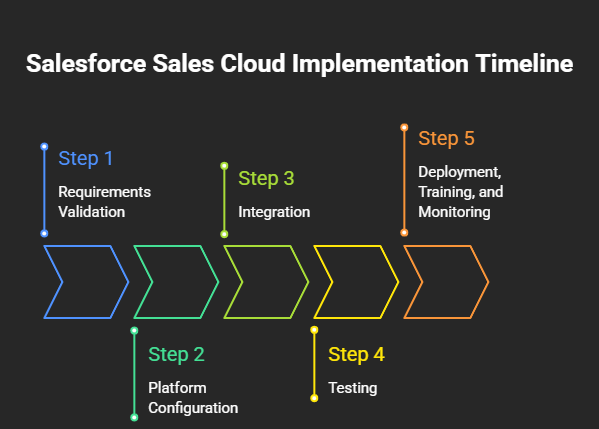
Timeline of a Successful Salesforce Marketing Cloud Implementation
The timeline of Salesforce Marketing Cloud implementation depends heavily on the deployment. A single-brand rollout with the straightforward email and with the one CRM integration typically takes six to eight weeks.
Mid-sized deployments involve multiple SMS, business units, and advertising studios that commonly run ten to fourteen weeks. Furthermore, enterprise rollouts spanning complex data models, several regions, and multiple source systems can also take four to six months.
What Should Be The Framework For Salesforce Marketing Cloud Deployment?
A dependable framework for Salesforce Marketing Cloud deployment is built on four pillars: data architecture, governance, journey design, and measurement.
- Governance means clear ownership of who can build, send, and approve.
- Data architecture means your subscriber and data extension model is scalable and documented.
- Journey design means every automation is mapped to a specific customer outcome and it is not built reactively.
- Measurement means dashboards exist from day one, not bolted on once leadership asks for results.
McKinsey research shows that companies that apply structured personalisation frameworks see marketing ROI increase by 10 to 30 percent, and this is because the messaging is grounded in a defined data structure rather than guesswork. If you treat these four pillars as important checkpoints, it will eventually help you out to get the results more aligned to your objectives.
Checklist for Salesforce Marketing Cloud Implementation
For the implementation procedure, you can use this checklist as a pre-launch review before any journey goes live.
1. Planning Stage
- The marketing lead defines KPIs, use cases, and the structure of the business unit.
- The data architect completes data source mapping and the subscriber key strategy before any build work begins.
2. Configuration and Testing
- The Marketing Cloud admin sets sending domains, compliance settings, and permissions.
- The campaign manager runs sandbox journeys with realistic sample data during testing, so that if there are any issues, it should be flagged before go-live.
3. Migration and Launch
- The integration specialist validates the synchronization of the CRM.
- The Marketing Cloud admin resolves subscriber counts and content assets during migration.
- Lastly, at launch, the marketing lead strictly monitors deliverability and journey completion for the first 30 days.
Best Strategy for Salesforce Marketing Cloud Rollout
The best Strategy for Salesforce Marketing Cloud rollout is rarely the fastest one, as UK organisations that phase their rollout by use case begin with a single high-value journey before expanding.
This reflects what DMA UK's latest tracking shows about the wider email channel. The brands that measure properly and take action on that data are the ones improving, with the reported value of email climbing to nearly £41 for every £1 spent as segmentation and measurement practices mature. In simple words, a phased Marketing Cloud rollout follows the same logic, prove value early, then simultaneously scale with confidence.
Organize Your Salesforce Marketing Cloud Implementation with ProvidusCRM
A successful Salesforce Marketing Cloud implementation is not defined and measured by how quickly it launches, but mainly by how completely it is used six months later. Getting the journey architecture, governance, and data model right from the outset is the main element.
If your organisation is planning for a marketing cloud rollout, a migration from another platform, or even only a broader Salesforce deployment. ProvidusCRM's certified Salesforce consultants can help you build a plan that will be grounded in your actual customer journeys rather than a generic template. Explore ProvidusCRM's Salesforce Marketing Cloud consulting services, or get in touch to talk.
Conclusion
An impactful Salesforce Marketing Cloud implementation is a disciplined process of data modelling, scoping, phased configuration, and testing, backed by a monitoring plan nobody hopes to need, but everyone has rehearsed.
The organisations that get this step right eventually treat data architecture and governance as project deliverables from the first one. Following the steps outlined here won't only make your implementation effortless, but it will make it more predictable, and predictable is exactly the point that protects your budget, your timeline, and your team's confidence in the platform you are building.
Frequently Asked Questions
1. Can Salesforce Marketing Cloud be implemented without Sales Cloud?
Yes, Marketing Cloud runs as a standalone platform and can integrate later with any CRM, not just Salesforce's own.
2. Who typically owns Marketing Cloud after implementation, IT or marketing?
Ownership usually sits with marketing operations, with IT retained only for security, integrations, and infrastructure support.
3. What certifications should an implementation partner or in-house admin hold?
Look for the Salesforce Marketing Cloud Administrator and Marketing Cloud Developer certifications as the baseline credentials.
4. Is there an extra license cost for Marketing Cloud Connect?
No, Marketing Cloud Connect is a free managed package included with SFMC. However, users executing sends from CRM require assigned licenses in both Marketing Cloud and Sales or Service Cloud.
5. How often should the data model be revisited after go-live?
Most teams review data extensions and subscriber architecture quarterly to keep pace with new campaigns and data sources.
