


With Data Cloud and Agentforce now an integral part of the platform, Salesforce has become the operational layer that AI agents draw on to route cases, make decisions, and act on customer data.
To ensure you make the most of your CRM investments in 2026, we’ve put together a Salesforce implementation checklist that helps you deploy your new CRM org without governance, data quality, or integration gaps. It also highlights where Salesforce integration services play a key role in creating a connected, AI-ready ecosystem.
This Salesforce implementation guide breaks down the exact steps, pitfalls, and best practices businesses need to plan for before their first AI-ready Salesforce organisation goes live. Whether you are preparing an internal team or evaluating implementation partners, the checklist below provides a clear standard to understand and measure any proposal against.
Why Salesforce Implementation Requires a Different Playbook in the AI Era?
Businesses are now adopting AI faster than most realise. According to the Office for National Statistics, self-reported AI use among businesses with 10 or more employees has risen from around 12% to roughly 35% since late 2023.
This growth puts pressure on the underlying CRM. Einstein, Agentforce, and other AI tools only perform as well as the workflows and data sit beneath them. This is the element that makes the Salesforce implementation process more consequential than it was ever before.
The stakes are not new or unique to Salesforce, either. McKinsey's long-running research into transformation programmes has found that less than 30% of digital transformations succeed at sustaining the gains and improving performance.
A rushed rollout not only risks missing deadlines, but it also risks an AI layer built on broken foundations, which is exactly why a documented Salesforce implementation checklist matters more.
For businesses planning an in-house build or comparing implementation partners, this is the moment to slow down and mainly validate the approach. The choice made at this stage shapes timeline, cost, and adoption for years afterward.
Step-by-Step Process of the Salesforce Implementation Process
A dependable Salesforce implementation process follows a sequence, and each phase should be validated before the next one begins.
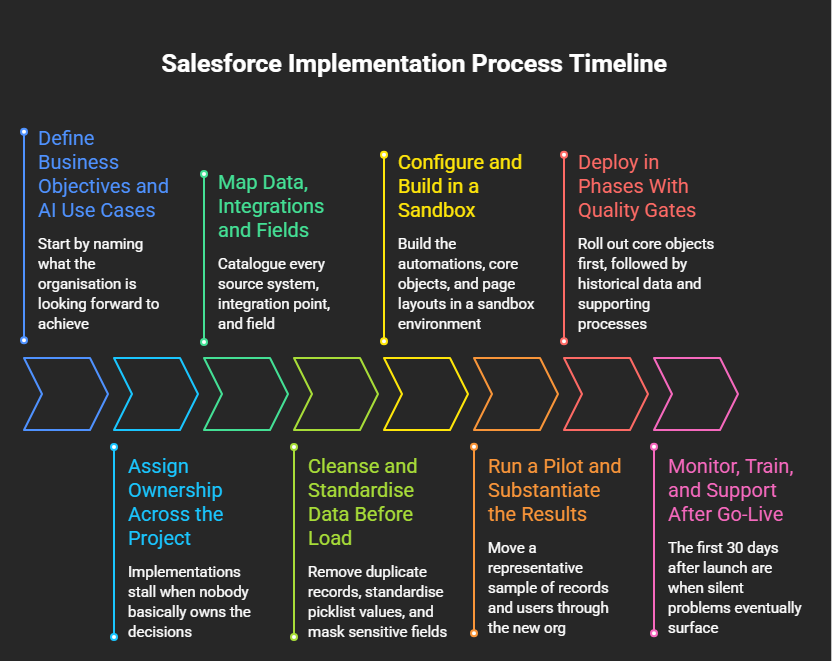
1. Define Business Objectives and AI Use Cases
Start by naming what the organisation is looking forward to achieve, whether that is service data or unifying sales, retiring a legacy CRM, or even preparing for Agentforce. This decision shapes every step that follows.
Be specific about which AI use cases matter, such as lead scoring or automated case routing. Vague ambitions mainly produce vague configurations that no one can measure against later.
2. Assign Ownership Across the Project
Implementations stall when nobody basically owns the decisions. A Salesforce administrator, a business sponsor, and a data steward should be responsible for governance from day one.
Every object group, such as cases, accounts, or opportunities, should have a named business owner who signs off before that data goes live.
Without clear ownership, small decisions get deferred repeatedly, and eventually these deferred decisions are what push go-live dates back by months rather than weeks.
3. Map Data, Integrations and Fields
Catalogue every source system, integration point, and field before configuration begins. Furthermore, flag mandatory Salesforce fields that have no clear equivalent in the source data early.
This mapping becomes the main reference document for the upcoming steps of your Salesforce implementation, and later, your audit trail for compliance reviews.
4. Cleanse and Standardise Data Before Load
Remove duplicate records, standardise picklist values, and mask sensitive fields before anything reaches a sandbox. AI features compound the bad data rather than correcting it further.
Cleaning data after go-live costs far more in time, rework, and lost organizational trust than cleansing it properly upfront.
5. Configure and Build in a Sandbox
Build the automations, core objects, and page layouts in a sandbox environment first. This is the point where Agentforce actions and prompts should be tested and configured against real data.
Document configuration decisions as you go, a written record eventually saves significant time when a future admin needs to understand why a rule was built a certain way.
6. Run a Pilot and Substantiate the Results
Move a representative sample of records and users through the new org. Check that automation fires correctly, record counts reconcile against the source system, and relationships stay intact.
A pilot that only tests whether the system technically works interestingly misses half the picture. User experience needs testing too. Ask pilot users directly whether the new workflows are slower or faster than what they replaced. Furthermore, their answer predicts adoption more reliably than any technical metric.
7. Deploy in Phases With Quality Gates
Roll out core objects first, followed by historical data and supporting processes. A failed phase needs to be fixed before the next one begins.
8. Monitor, Train, and Support After Go-Live
The first 30 days after launch are when silent problems eventually surface. Track adoption, error logs, dashboard accuracy, and schedule formal check-ins at day 7, day 14, and mainly day 30.
What are the Best Practices of Salesforce Implementation?
The best practices of Salesforce implementation are less about advanced technical skill, and it is more related to discipline applied consistently across every phase and step of the project. Sequence data loads correctly, and loading child records before parent records breaks referential integrity and also produces orphaned records that are difficult to trace later.
Moreover, treat field mapping as a cross-functional exercise, not only a spreadsheet task handed to one person. Decisions made in isolation tend to surface as production bugs. You should never skip the sandbox stage, even under deadline pressure. It is basically the last opportunity to catch bad data and broken logic too, before customers are affected.
Common Salesforce Implementation Mistakes to Avoid
Even teams working from a solid Salesforce implementation checklist fall into a handful of recurring traps. Recognising them early is far cheaper and more helpful than fixing them in production. Teams that jump straight to configuration and skip agreeing on scope mainly end up rebuilding large parts of the organisation after go-live.
Leaving automation switched on during data load. Triggers and active workflows create noise that makes real load errors far harder to spot and fix.
Checklist for A Practical Salesforce Deployment
You can use this Salesforce deployment checklist as a pre-launch reference across every phase and aspect of the project.
A Practical Salesforce Deployment Checklist
- Planning & Objectives: Define scope, business goals, and AI use cases in writing
- Ownership: Assign a Salesforce administrator, business sponsor, and data steward
- Data Mapping: Complete field-level mapping including required fields and External IDs.
- Data Preparation: Deduplicate, cleanse, and mask sensitive records before staging
- Sandbox Build: Automate, configure objects, Agentforce actions in sandbox
- Pilot Testing: Validate record counts, relationships, and automation with real users
- Phased Go-Live: Deploy core objects first, then supporting processes, in gated phases
- Hypercare: Monitor adoption and run check-ins at day 7, 14, and 30
How Can You Build an AI-Driven Salesforce Implementation?
An AI-driven Salesforce implementation carries unique operational risks that a traditional rollout does not. Gartner predicts that over 40% of agentic AI projects will be cancelled by the end of 2027, and the reason is escalating costs, weak risk controls, and unclear business value.
Many of those cancellations trace back to the AI features bolted onto an organisation that was never properly implemented in the first place. Agentforce needs defined permissions, clean data, and tested workflows to act reliably.
Before enabling any of the AI agent, confirm that the underlying security settings, data model, and automation logic have already been validated. AI should sit on top of a stable Salesforce CRM implementation, not substitute for one.
Right Strategy for the Salesforce Implementation
The right strategy for Salesforce implementation depends on scale. Smaller rollouts with straightforward data can mostly use Salesforce's native import tools and a lean internal team.
AI-driven deployments with multiple integrations typically require a dedicated partner who has handled Data Cloud configuration and Agentforce before, particularly where compliance or regulated data is involved.
An implementation without a properly funded admin role tends to drift within months, as permissions, automation and dashboards slowly fall out of step with how the business actually works. This is also where a broader Salesforce implementation for businesses strategy pays off and treats the rollout as an ongoing capability rather than a one-time project.
Get Your Salesforce Implementation Right Away
ProvidusCRM's certified Salesforce consultants have delivered AI-ready implementations for organisations across nonprofits, financial services, and logistics sectors. From the first discovery workshop towards Agentforce configuration, every engagement follows the same disciplined Salesforce implementation checklist outlined in this guide, adapted to your data, your compliance requirements, and your industry.
Explore ProvidusCRM's Salesforce Implementation Services to talk through your timeline, scope, and AI readiness with a certified team.
Ending Note
A dependable Salesforce implementation checklist turns a high-risk project into a predictable one. Objectives, clean data, ownership, and phased validation matter more than the AI features layered on top.
Businesses that treat implementation as a discipline and not a deadline are the ones whose AI investments actually deliver a return.
Frequently Asked Questions
1. What is included in a Salesforce Implementation Checklist?
A complete Salesforce implementation checklist covers ownership, objective-setting, data mapping, cleansing, sandbox testing, phased go-live, and 30-day post-launch monitoring.
2. How long does a Salesforce implementation take?
It actually varies, small deployments with simple mappings can take two to four weeks. Mid-sized projects typically run six to twelve weeks.
3. What makes an AI-driven Salesforce implementation different?
AI features such as Agentforce depend on defined permissions, clean data, and tested automation. Implementations built for AI need stricter validation and data governance than a standard CRM rollout.
4. Do small businesses need a formal Salesforce Implementation Process?
Yes, though the scale differs, even a small rollout benefits from sandbox test, defined objectives, and a rollback plan.
5. What is the biggest cause of Salesforce implementation failure?
Unclear business objectives and poor scope planning, not the platform itself.
6. Can Salesforce implementation be done without an external partner?
Smaller, low-complexity projects can, but larger or AI-driven implementations generally benefit from a certified partner.
7. How do I measure whether a Salesforce implementation succeeded?
Track data quality, adoption rates, and whether the original business objectives from the planning phase were met, not just whether the system technically went live on schedule.
