


Transferring customer data into Salesforce sounds quite simple, but it’s not. Somewhere between the go-live date and the export file, fields stop lining up, records go missing, and automations start firing on the wrong triggers, and this happens quite often.
Research from the European Commission's CORDIS programme has found that 40% of all migrations fail or exceed their schedule and budget, a figure that holds up across industries and platforms.
Following the proven best practices of Salesforce data migration, what truly separates a CRM is teams that trust from day one and a project that quietly drains budget for months after go-live.
This guide explains the complete Salesforce data migration process, the mistakes that cause most failures, and also a practical checklist your team can use before the first record moves.
Why Does Salesforce Data Migration Goes Wrong?
A Salesforce data migration rarely fails because of the platform itself. Salesforce is actually built to handle enormous data volumes reliably, and it fails because of how the data is sequenced, prepared, and even validated before it ever reaches the org.
Bloor Research put the failure rate for data migration projects at 38%, and identified a lack of ownership and poor planning over data quality as the main leading causes.
Separately, research by Gartner on enterprise data quality found that poor data quality costs the average organisation $12.9 million every year. For a CRM migration, that cost shows up as duplicate accounts, broken reports, and sales reps who stop trusting the system just within weeks of launch.
This is exactly why a documented Salesforce data migration strategy matters more than the migration tool that you choose. Tooling can move data quickly, but only a strategy can guarantee that what moves is complete, accurate, and usable. Let’s understand it step by step.
Step-by-Step Process of The Salesforce Data Migration Process.
A reliable Salesforce data migration process involves a sequence of gated phases, where each phase has to pass validation before the next one starts.
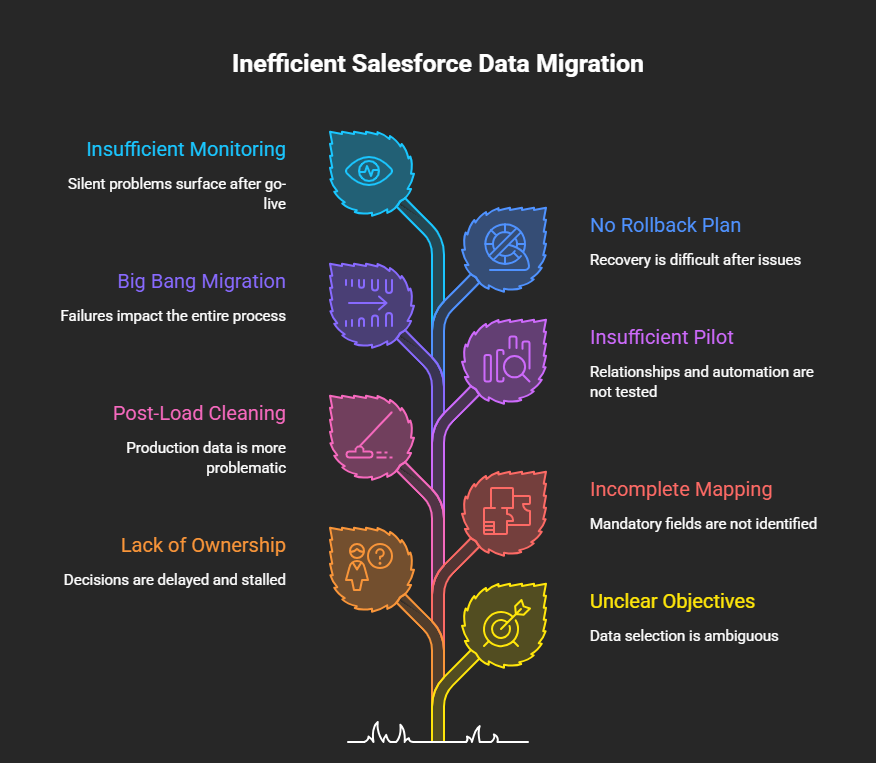
1. Define objectives and Scope
Before the start of exportation, agree on what the migration is actually for. Consolidating two Salesforce orgs after an acquisition, retiring a legacy CRM, or even preparing clean data for AI-driven features, for example Agentforce. This objective mainly decides what data is worth migrating and what data should be archived.
2. Assign Clear and Visible Ownership
Migrations stall when nobody actually owns the decisions. At minimum, assign a data owner on the source-system side, a Salesforce-side data supervisor responsible for governance and schema, and a business sign-off owner for each object group.
3. Build a Complete Mapping Document and Data Inventory
Catalogue every source field, object, and relationship, then map each one to its Salesforce equivalent. You should flag mandatory Salesforce fields that have no clear source match early. This mapping document will become your reference for the rest of the Salesforce data migration guide, and eventually later, your audit trail for the compliance reviews.
4. Cleanse Before You Load but Not After
Standardise picklist values, deduplicate records, and mask sensitive data before anything touches a staging environment, but remember not after. Loading dirty data and then cleaning it in production is significantly more problematic and expensive than cleaning it beforehand.
5. Run a Pilot Migration
Move a representative sample into a sandbox and then check more than whether the load succeeded technically. Confirm relationships stayed intact, automation rules fired correctly, and record counts reconcile between target and source.
6. Migrate in Phases with the Quality Gates
Load contacts and accounts first, then products and opportunities, then activity history. A failed phase should be fixed first before the next phase begins. It should not be patched later while new data keeps loading on top of it.
7. Build and Rehearse a Rollback Plan
Every serious best practices for Salesforce migration framework treats rollback as a deliverable, not as an afterthought. Take time-stamped backups before every phase, define rollback triggers in writing, and then rehearse the recovery process at least once before go-live.
8. Monitor for 30 Days After Cutover
The first month after go-live is actually when silent problems surface. Track adoption, dashboard accuracy, error logs, and schedule formal check-ins at day 7, day 14, and yes, at day 30.
Most Common Salesforce Data Migration Mistakes to Avoid
- Loading child records before parent records: breaks referential integrity immediately, and then it produces orphaned records.
- Treating field mapping as a spreadsheet exercise: decisions made without any cross-functional input will definitely surface as production bugs later.
- Skipping the staging environment: it actually removes your last chance to catch bad data before it comes into the permanent stage.
- Leaving automation switched on during load: creates noise that makes real errors harder to spot.
Avoiding these common Salesforce data migration mistakes is less about technical sophistication and more about discipline.
How to Migrate Data to Salesforce Without Losing Trust in Your CRM?
Knowing how to migrate data to Salesforce correctly comes down to validation and sequencing, not the size of your budget. Smaller migrations under roughly 50,000 records with simple mappings can mostly be handled with Salesforce's native Data Import Wizard or even with Data Loader.
Larger, multi-source migrations with complex transformation logic typically need a dedicated ETL layer and a team that has done this before.
This is the point where a structured Salesforce CRM data migration partner earns its value, not by running the load faster, but yes, by catching the compliance risks, mapping gaps, and referential integrity issues before they become production incidents.
Streamline Your Data Migration with ProvidusCRM
A successful Salesforce data migration is a disciplined process of mapping, scoping, cleansing, validation, and phased loading, which is backed by a rollback plan nobody hopes to use, but everyone has rehearsed.
The organisations that get this right treat data quality as a project deliverable from the first, not a cleanup task for after go-live.
Following the best practices of Salesforce data migration outlined in this guide won't make your migration effortless, but it will definitely make it predictable, and predictable is exactly what protects your timeline, budget, and your team's trust in the CRM that you are building.
If your organisation is planning a CRM consolidation, a legacy system retirement, or even a move to Salesforce ahead of an Agentforce rollout, remember that getting the data foundation right from day one will help you to avoid monthsB of costly correction later.
ProvidusCRM's certified Salesforce consultants have delivered complex, zero-downtime migrations for UK organisations across logistics, nonprofit sectors and financial services. Explore Salesforce Migration Services to talk through your timeline, migration scope, and risk profile with a certified team.
Frequently Asked Questions
1. What is the Salesforce data migration process?
The structured transfer of records, contacts, accounts, opportunities, and related objects from a source system into Salesforce that covers mapping, scoping, staging, cleansing, phased loading, and post-migration monitoring.
2. How long will a Salesforce data migration take?
Small migrations with simple mappings can eventually take two to four weeks. Mid-sized projects typically run six to twelve weeks, and even enterprise migrations can take three to six months.
3. What is the biggest cause of Salesforce migration failure?
Inadequate planning and poor data quality, but not the migration tool itself.
4. Do I need a rollback plan for a Salesforce migration?
Yes, a rollback plan that has not been rehearsed isn't a real plan.
5. Can Salesforce data migration be done without downtime?
In multiple cases, yes, using a phased approach with a short, coordinated cutover window.
