

Every Salesforce project reaches the same point where a new requirement lands on the backlog, and someone has to decide whether this can be solved with clicks or whether it needs code. Get that call wrong, and a business will overpay for complexity it never needed, or it will even build a workaround that breaks the moment Salesforce ships its next release.
The decision between Salesforce customisation and configuration shapes far more than a single feature. It determines how much your org costs to maintain and how quickly your admin team can respond to change. Whether your Salesforce investment stays flexible or even turns into a maintenance burden.
What Is Salesforce Configuration?
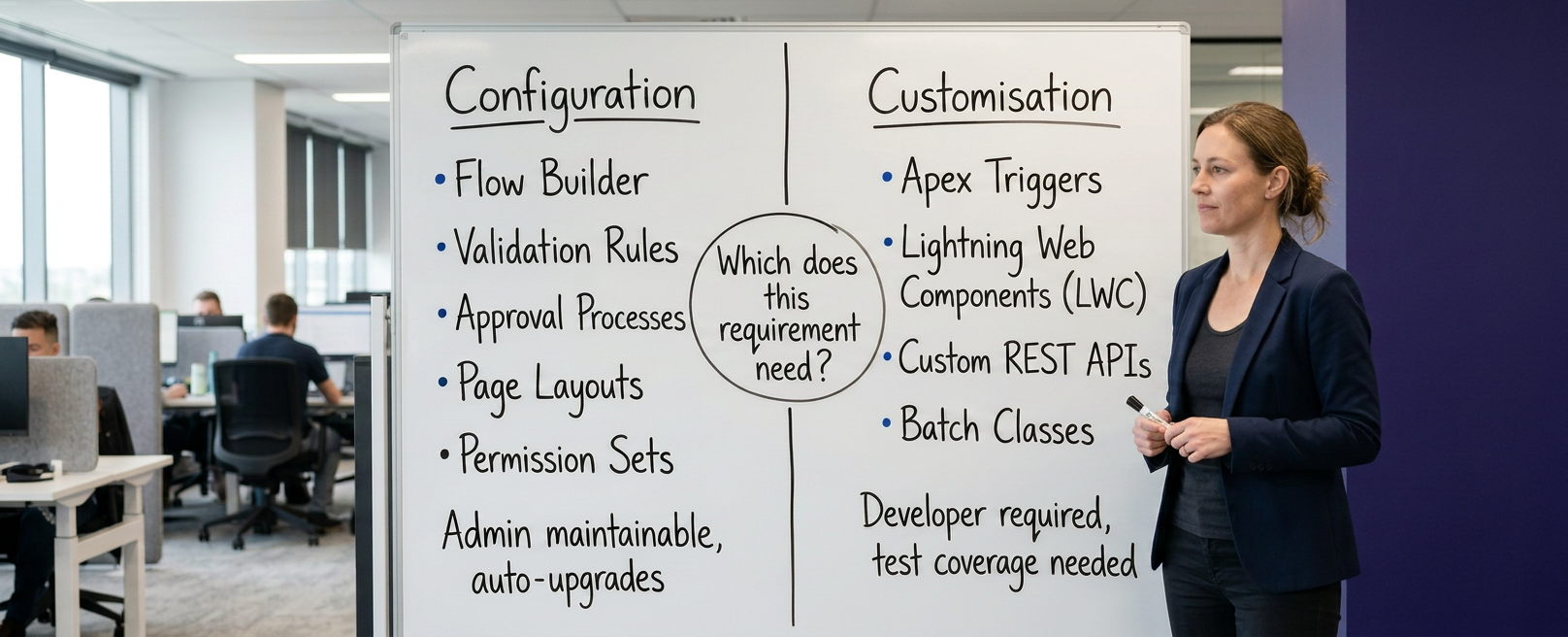
Salesforce configuration (also known as declarative development) refers to building functionality using native, point-and-click tools inside Salesforce Setup without writing custom code. No custom code is written, and all changes reside within Salesforce's native metadata framework. Admins work directly inside Setup and use tools built for exactly this purpose.
Typical configuration includes page layouts, custom fields, validation rules, approval processes, permission sets, and Flow-based automation because everything sits inside Salesforce's supported metadata framework, and configuration upgrades automatically alongside every seasonal platform release.
This is the reason why most Salesforce implementation partners try to solve as much of a project brief as possible through configuration first. It is faster to build, easier to hand over to an internal admin, and, importantly, far cheaper to change six months later when the business process shifts again.
Why is Salesforce Customisation Necessary?
Configuration mainly has limits, and some business logic simply cannot be expressed through clicks, no matter how much creative the Flow Builder canvas gets. This is the reason why customisation, writing Apex code, building custom APIs, or developing Lightning Web Components (LWC) come in.
Salesforce customisation (also known as programmatic development) is required when business requirements exceed standard declarative tools, such as performing high-volume multi-object calculations or complex API integrations.
Moreover, it needs to call an external system in real time, or even must run logic that native automation tools cannot support, for instance, recursive triggers with conditional bulk processing. It is also required for genuinely bespoke user interfaces that a standard Lightning page cannot deliver.
Understanding this trade-off is central to solving the Salesforce customisation vs configuration question correctly. Custom code demands version control, ongoing testing, and a developer who understands the org's history.
According to McKinsey's CIO research cited by consulting firm Elements Cloud, organisations typically divert between 10% and 20% of their technology budget for new products toward resolving technical debt, and CIOs estimate that unmanaged debt can represent 20% to 40% of their entire technology estate's value. Importantly, heavily customised orgs are more exposed to that risk than configured ones.
Difference Between Salesforce Customisation and Configuration
| Dimension | Salesforce Configuration (Declarative) | Salesforce Customization (Programmatic) |
|---|---|---|
| Core Tools | Flow Builder, Validation Rules, Page Layouts, App Builder | Apex, Lightning Web Components (LWC), Custom APIs |
| Primary Skillset | Salesforce Administrator / Business Analyst | Salesforce Developer / Technical Architect |
| Maintenance & Upgrades | Automatically updated by Salesforce seasonal releases | Requires custom unit tests ($>75\%$ coverage) & regression testing |
| Build & Deployment Speed | Fast; deployed via Change Sets or DevOps tools | Slower; requires version control, sandbox deployment, and code review |
| Governance & Debt Risk | Low technical debt; safe for non-developers | High potential technical debt if unmanaged; subject to Governor Limits |
| Ideal Use Cases | Standard CRUD, simple field automation, linear approvals | Complex calculations, real-time external APIs, custom UI/UX |
The main difference between Salesforce customisation and configuration comes down to who builds it, what tools they use, and, yes, how the result behaves during a platform upgrade. This distinction is sometimes framed the other way round, as Salesforce configuration vs customisation, but the underlying logic is identical either way.
Configuration is built by admins inside Setup, using declarative tools, and it is upgraded automatically with each Salesforce release. Customisation is built by developers using Apex, Lightning Web Components (LWC), and custom REST/SOAP integration endpoints, and it must be tested and sometimes rewritten after major releases.
Configuration is also generally faster to build and much cheaper to maintain, while customisation offers far greater flexibility for genuinely unique requirements. Neither approach is inherently better, but the right choice depends entirely on what the business actually needs solved.
Comparison between Salesforce Declarative and Programmatic Development
Inside Salesforce, this same split is mostly described as Salesforce declarative vs programmatic development. Declarative development means guiding Salesforce on what outcome you want, through validation rules, flows, and formula fields, and letting the platform work out how to deliver it.
Programmatic development means writing the "how" yourself, in JavaScript or Apex. Furthermore, declarative tools have grown far more powerful in recent years. Modern Flow Builder can now handle approval routing, scheduled automation, and even callouts to external services that once required a trigger.
On the other hand, programmatic development still wins when logic needs to branch in ways declarative tools cannot express cleanly, or when performance at high data volumes matters more than build speed.
When to Use Salesforce Configuration?
When to use Salesforce configuration is usually the first question that is worth asking, because it is a lower-risk and lower-cost path. Configuration is the right fit whenever a requirement maps closely to existing automation patterns and standard Salesforce objects.
Use configuration for adjusting page layouts or building, creating custom fields and objects, setting up approval processes, building Flow-based automation for record notifications and updates, and defining permission sets or role hierarchies. It is also the right call whenever an internal admin, rather than a developer, needs to be able to maintain the feature going forward without waiting on external support.
When to Use Salesforce Customisation?
When to use Salesforce customisation becomes the most relevant question once a requirement genuinely exceeds standard capabilities. Customisation is justified only when a process needs complex real-time integrations with external systems that exceed Flow's native HTTP Callout capabilities, complex multi-object calculations that eventually Flow cannot process without hitting governor limits, or a fully bespoke interface, such as a custom Lightning Web Component for a unique workflow.
For organisations requiring more advanced connectivity between Salesforce and external platforms, salesforce integration services can support requirements that go beyond what standard configuration can provide.
It also makes sense when a business process is genuinely unique to the organisation. Forcing a one-off requirement into standard configuration only to avoid code mostly produces something more fragile than a properly built and well-documented customisation.
Example of Salesforce Configuration vs Customisation
Concrete examples of Salesforce configuration vs customisation make the distinction easier to apply in practice.
- A validation rule that stops a case from closing without a resolution field filled in is a configuration.
- A Flow that sends a follow-up email seven days after a lead is created is a configuration.
- An approval process routing a discount request above 20% to a sales director is a configuration.
- An Apex trigger that recalculates commission across three related objects the moment an opportunity closes is customisation.
- A Lightning Web Component that renders a live shipment-tracking map pulled from a third-party logistics API is a customisation.
- A custom batch Apex job that reconciles nightly stock levels between Salesforce and an external warehouse system is a customisation.
Difference between Salesforce Low-Code vs Custom Code
The debate on Salesforce low-code vs custom code is playing out across the whole software industry, not only inside Salesforce orgs. Gartner projects that 70% of new applications built by enterprises will use low-code or no-code technologies by 2026, up from under 25% in 2023, according to ToolJet's analysis of Gartner's research. Moving further, Salesforce's own Flow Builder is a direct beneficiary of this shift, and it is really just another face of the Salesforce Customisation vs Configuration question.
The pull towards low-code is not only related to build speed. Custom code carries a genuine and ongoing cost. Independent research into enterprise software maintenance, cited by IT consultancy Savi, puts annual maintenance at roughly 15% to 20% of the original build cost, year after year, for as long as that code stays in production.
This does not mean custom code should be avoided altogether, but it means every line of Apex should be a deliberate decision, made because configuration genuinely cannot deliver the outcome, not because it was the first idea that came to mind.
How to Choose Between Salesforce Configuration and Customisation?
Deciding between Salesforce customisation and configuration becomes straightforward by asking a few key architectural questions. Does a standard Salesforce object already support this? Or can a validation rule, Flow, or approval process express the logic without contorting itself? Will an admin need to maintain this without developer support?
If the answers point towards yes, configuration is almost always the right starting point. If the requirement involves complex conditional logic across multiple objects, real-time external integration, or a genuinely bespoke interface, customisation earns its place.
The strongest Salesforce orgs are rarely built entirely one way or the other, but they are configured wherever possible and customised only where it is genuinely justified, which keeps both complexity and cost under control.
Align Your Salesforce Build With ProvidusCRM
Getting the balance right, the first time, protects your org's long-term flexibility and your organisation's budget. It is exactly the kind of decision that an experienced Salesforce partner would take.
ProvidusCRM's certified Salesforce consultants help UK businesses navigate the Salesforce customisation vs configuration decision with confidence and also assess every requirement against both paths before recommending a build approach. Explore Salesforce Customisation Services to talk through your specific requirements, or get in touch with our team directly.
Conclusion
Choosing between Salesforce customisation and configuration is not a one-time decision, but it is a recurring judgement call that eventually shapes how your org will evolve. Configuration keeps things simple, admin-maintainable, and upgrade-safe. Customisation unlocks what the platform cannot do out of the box.
Getting this balance right is the main point that separates a Salesforce org that stays agile from one that quietly accumulates fragility and cost. You should treat every “we build this with code?” question with the same discipline, and your CRM will keep pace with your business.
Frequently Asked Questions
1. What is the main difference between Salesforce customisation and configuration?
Configuration uses Salesforce's native, point-and-click tools, such as validation rules and Flows, while customisation involves writing code, such as Apex or Lightning Web Components, in order to build functionality the platform cannot deliver declaratively.
2. Is Salesforce configuration cheaper than customisation?
Generally, yes. Configuration is faster to build, easier for an internal admin to maintain, and it also upgrades automatically with Salesforce's seasonal releases, while custom code requires ongoing testing and developer support.
3. Can Salesforce customisation break during a platform upgrade?
Yes, it can, but Custom Apex triggers, batch classes, and LWC components require ongoing unit testing and occasional maintenance or even rewriting after major Salesforce releases, which is one reason configuration is usually the preferred first option.
4. Should a small business ever need Salesforce customisation?
Yes, if a requirement genuinely cannot be solved declaratively, for instance, a real-time integration with an external system. The complexity of the process matters more than the size of the business.
5. How do I know if my requirement needs configuration or customisation?
Start by asking whether a standard object, Flow, or validation rule can express the complete logic. If it can, use configuration, but if it requires real-time integration or complex multi-object logic, customisation is justified.
