


Businesses invest heavily in CRM platforms to improve revenue forecasting, build predictable sales processes, and strengthen customer relationships, but buying a Salesforce Sales Cloud license is only the starting point. The real value comes from implementing it correctly. A structured Salesforce Sales Cloud implementation ensures sales teams work with automated workflows, clean data, and meaningful insights instead of correcting manual errors.
Research by Nucleus Research shows that CRM deployments achieve significant financial returns, with CRM implementations yielding up to $8.71 per dollar spent when organizations prioritise process standardization, user adoption, and data quality over basic setup.
For organisations planning digital transformation in 2026, implementation has grown far more complex than just configuring standard objects. Modern businesses need AI-driven forecasting, integrations, automation, secure governance, and scalable architecture.
What Is Salesforce Sales Cloud Implementation?
Multiple organisations assume implementation simply means importing records and creating user accounts, but in reality, what is Salesforce Sales Cloud implementation? It is a structured transformation that turns sales operations into a scalable digital ecosystem by designing security models, configuring core automation, migrating data, integrating external tools, and preparing teams for adoption.
A successful Salesforce Sales Cloud implementation involves much more than basic configuration. Each stage affects reporting accuracy, user adoption, and long-term performance. Rather than forcing business workflows to fit default settings, organisations should configure Salesforce around their core business needs while optimising manual processes, reducing disruption, and increasing acceptance during rollout.
Why Do Organisations Prioritise Sales Cloud in 2026?
Sales teams generate data across marketing platforms, websites, ERPs, and support software. But without a centralised CRM, this information fragments and makes accurate forecasting and engagement increasingly difficult.
According to IBM, organisations investing in stronger data governance and visibility reduce operational risk while improving resilience and decision-making. A properly implemented Sales Cloud environment supports this by creating a trusted, centralised source of customer data across departments while also replacing spreadsheets with automated workflows, full pipeline visibility, and real-time dashboards.
This is why having a structured Salesforce Sales Cloud implementation strategy is increasingly important for organisations looking to improve sales operations and make better use of their CRM data.
Salesforce Sales Cloud Implementation Guide
Every successful deployment begins with a structured Salesforce Sales Cloud implementation guide rather than jumping straight into configuration. Projects mostly fail because teams focus on technical setup before fully understanding business requirements.
A comprehensive Salesforce Sales Cloud implementation plan defines stakeholder responsibilities, project objectives, technical architecture, security requirements, integration points, and post-deployment governance that keep teams aligned throughout.
It should also establish measurable success indicators such as forecasting accuracy, user adoption, data quality, and sales productivity. This ensures that success is judged by business outcomes, not only by technical completion.
Why Is Business Assessment Necessary Before Implementation?
Successful implementation begins with understanding existing operations before configuring anything. Technical teams should document current sales workflows, identify operational bottlenecks, and evaluate how customer data moves across enterprise systems, typically through interviews with managers, reps, support, marketing, and executives, whose feedback shapes automation priorities.
Existing CRMs, spreadsheets, and third-party apps should also be analysed to gauge migration complexity. Catching duplicate records before migration importantly reduces risk later.
This assessment forms an important part of Salesforce Sales Cloud implementation planning because it establishes what needs to change, what should remain unchanged, and which Salesforce capabilities are required.
Planning the Salesforce Sales Cloud Setup Process
The Salesforce Sales Cloud setup process goes far beyond installation, which means building an environment that reflects organisational structure, sales methodology, and policy while staying scalable for growth.
Teams begin by defining fiscal years, organisational hierarchies, user roles, profiles, and permission sets, establishing a security architecture that enforces least-privilege access. Organisations handling sensitive data should apply the principle of least privilege, so users access only what their role requires.
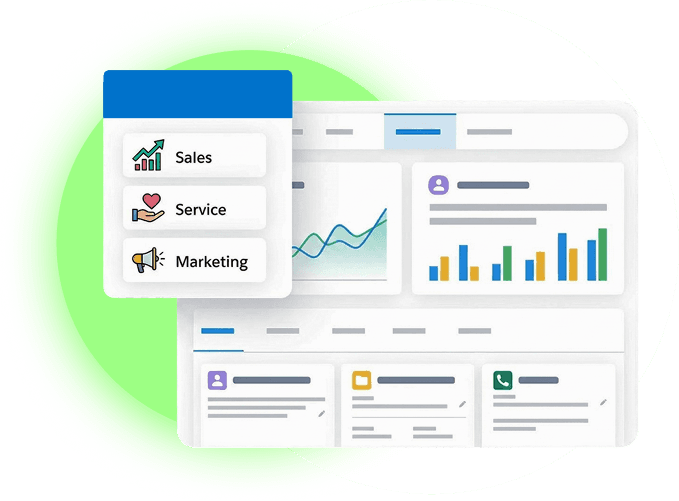
The setup should also cover lead management, opportunity stages, sales processes, approval workflows, forecasting, dashboards, reports, and automation. Each component should support the organisation's actual sales processes rather than simply relying on default settings.
Preparing for Salesforce Sales Cloud Data Migration
Data migration is one of the most underestimated phases of implementation. Moving duplicated or inaccurate records into Salesforce creates reporting inconsistencies and also lowers user confidence from day one.
Before migration, remove duplicates, standardise data, validate contact details, and document field mapping clearly, preserving relationships between contacts, accounts, and opportunities for accurate reporting.
Staging environments let teams validate migrated data before it touches live operations. This makes Salesforce Sales Cloud data migration an important part of the overall implementation process.
Salesforce Sales Cloud Integration
Modern sales teams rarely work within a single application. Sales Cloud may need to exchange information with ERPs, marketing platforms, accounting software, customer support applications, and other business systems.
During implementation, teams should identify all required integration points and determine how information will move between systems. APIs or middleware can be selected based on scalability, security, data volume, and business requirements.
Planning integration early helps prevent technical issues from delaying deployment later in the Salesforce Sales Cloud implementation process.
Steps for Salesforce Sales Cloud Implementation
With clear requirements and planning in place, execution begins. Following defined Salesforce Sales Cloud implementation steps reduces deployment risk by validating every configuration before go-live.
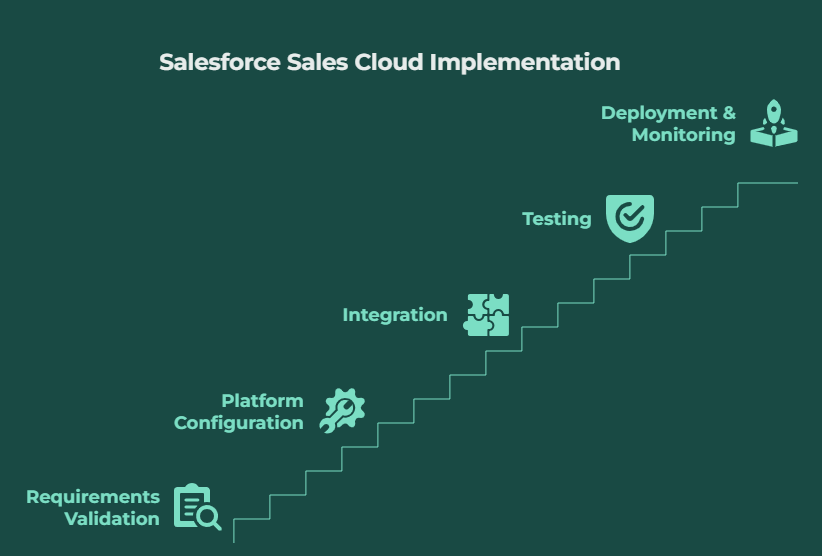
Step 1 – Requirements Validation
Confirm reporting needs, business processes, sales workflows, and security controls upfront to prevent costly late-stage changes.
Step 2 – Platform Configuration
Lead assignment rules, sales processes, opportunity stages, products, approval workflows, forecasting models, dashboards, and automation are configured to mirror real operations.
Step 3 – Integration
Sales Cloud is connected with required ERPs, marketing automation platforms, accounting software, and support tools. APIs or middleware should be selected based on scalability, security, and data requirements.
Step 4 – Testing
Functional testing validates workflow execution, integration testing verifies clean data exchange across systems, and User Acceptance Testing (UAT) engages business users to ensure everyday process alignment.
Step 5 – Deployment, Training, and Monitoring
The final stage involves deployment, user training, documentation, and post-go-live monitoring. Early monitoring catches adoption gaps and technical issues before they affect performance.
Salesforce Sales Cloud Implementation Best Practices
Following Salesforce Sales Cloud implementation best practices can help organisations reduce deployment risks and create a more sustainable CRM environment.
- Start with business requirements before configuration.
- Establish data governance before migration.
- Define security and access requirements early.
- Plan integrations before development begins.
- Keep configurations scalable and avoid unnecessary complexity.
- Test workflows and migrated data before deployment.
- Involve end users during User Acceptance Testing.
- Provide appropriate training before go-live.
- Monitor system performance and user adoption after deployment.
- Continuously review the Salesforce environment as business requirements evolve.
Salesforce Sales Cloud Implementation Checklist
A practical Salesforce Sales Cloud implementation checklist should cover the entire project lifecycle:
- Define business objectives and success metrics
- Document existing sales processes
- Identify stakeholders and user roles
- Define security and access requirements
- Plan Salesforce Sales Cloud configuration
- Audit and clean existing data
- Map fields and relationships for migration
- Identify required integrations
- Configure sales processes and automation
- Build reports and dashboards
- Conduct functional and integration testing
- Complete User Acceptance Testing
- Prepare users and training materials
- Deploy Salesforce Sales Cloud
- Monitor adoption and system performance
- Optimise the platform after launch
A structured approach to Salesforce Sales Cloud implementation helps organisations move from basic CRM deployment to a scalable sales environment that supports accurate reporting, efficient workflows, better forecasting, and long-term growth.
How to Select the Right Salesforce Sales Cloud Implementation Partner?
Choosing the right Salesforce Sales Cloud Implementation Partner can effectively shape project outcomes. Technology alone cannot solve operational challenges without salesforce consultants who understand business processes, integration architecture, and governance.
A strong partner starts by understanding your objectives rather than pitching solutions immediately. When evaluating partners, you should look at industry experience, certifications, methodology, and also post-deployment support. Evaluating partners on domain expertise, deployment methodology, and post-launch support delivers greater long-term value than selecting a provider based on initial cost alone.
Salesforce Sales Cloud Implementation for Beginners
Salesforce Sales Cloud Implementation for beginners begins with recognising that implementation is a structured business transformation, not only a software deployment. New users should understand standard functionality before layering in advanced automation.
Begin with user roles, core CRM objects, opportunity management, reporting, and dashboards to reduce complexity later. Working with experienced consultants helps beginners avoid pitfalls like excessive customisation and weak security. A gradual rollout typically drives stronger long-term adoption than deploying every feature at once.
Why Work with ProvidusCRM?
A result-oriented Sales Cloud implementation requires structured governance, technical expertise, and a genuine understanding of business operations. At ProvidusCRM, we help organizations design scalable Salesforce environments that automate sales workflows, increase pipeline visibility, and improve reporting accuracy.
Whether you are deploying Salesforce for the first time, modernizing a legacy CRM, or integrating complex enterprise systems, our certified consultants work closely with your teams to deliver scalable, secure, business-focused implementations with minimal disruption.
Conclusion
A successful Salesforce Sales Cloud Implementation isn't measured by how quickly the platform goes live, but by how effectively it supports business objectives. Organisations that prioritise governance, planning, data quality, and continuous optimisation see significantly greater long-term value than those focused only on technical configuration.
By following a structured approach and partnering with experienced specialists, businesses can eventually build a reliable sales platform that improves efficiency, forecasting, and mainly revenue growth.
Frequently Asked Questions
How long does implementation usually take?
Small deployments may take four to eight weeks.
What's the biggest challenge during implementation?
Poor data quality, weak user adoption, unclear requirements, and underestimating integration complexity.
Can existing CRM data be migrated into Sales Cloud?
Yes, historical data, records, and opportunities can be migrated after proper cleansing, validation, and field mapping.
Should organisations customise Sales Cloud?
Standard functionality should be prioritised wherever possible, but customisation only when native capabilities can't meet the requirement.
Why is user training important?
It improves adoption, reduces errors, and also ensures employees can effectively use automation, dashboards, and forecasting features.
Why work with an implementation partner?
An experienced partner reduces project risk, designs scalable solutions, manages integrations, and mainly supports long-term platform success.
