


Nonprofits can collect a donation in seconds, but the value of that donation depends on what happens afterwards. If gift, supporter, campaign, and recurring-giving data reach the CRM late or even land in the wrong record, fundraising teams lose the context needed for timely stewardship. This is the point where FundraiseUp Salesforce integration becomes more than a connector. It turns into a data pathway between the organisation’s fundraising operation and giving experience.
The opportunity is growing because digital giving is no longer a side channel. Nonprofit Tech for Good reports that 44% of surveyed online donors were enrolled in a monthly giving programme. This figure does not prove that only an integration increases revenue, but it shows why reliable donation data matters when digital giving and recurring giving are central to donor relationships.
The element that makes the integration technically interesting is the division of responsibility. FundraiseUp handles the online donation experience. Salesforce Nonprofit Cloud (and its AI capabilities under Agentforce for Nonprofits), with this it can act as the operational CRM layer.
Why Do You Have To Understand Back-End Work Before Configuring?
An impactful roadmap for FundraiseUp Nonprofit Cloud integration starts with one principle: do not treat the connection as a simple field-to-field export. The integration has to fit the existing data model, campaigns, matching logic, gift records, recurring commitments, and reporting requirements of the organisation.
FundraiseUp’s current documentation identifies that a dedicated Agentforce for Nonprofits integration is separate from its NPSP integrations and standard Salesforce. This distinction matters because selecting the wrong connector can create an object model and mapping. Before configuration, you should confirm which Salesforce fundraising environment is actually running and also whether the required nonprofit components are installed.
The core flow is straightforward. A supporter completes a donation through FundraiseUp. Then, the integration sends the relevant data to Salesforce, records are created or updated according to configured rules, and then fundraising staff can use the CRM record for stewardship, segmentation, reporting, and follow-up.
This is the point where Salesforce Nonprofit Cloud integration should be evaluated against core business requirements.
How to Integrate FundraiseUp with Salesforce?
Integrating FundraiseUp with Salesforce Nonprofit Cloud requires deploying Person Accounts and the NPC Fundraising module, authenticating via FundraiseUp’s native Salesforce connector, mapping custom fields and gift attributes, and establishing duplicate matching rules prior to enabling automatic real-time synchronization.
Getting the setup right starts with prerequisites, mapping, access, and choosing the right sync approach, and a technically sound FundraiseUp Salesforce integration setup treats these as sequential steps rather than a single one-off task. Here's how the process actually works:
- Prerequisites and access: FundraiseUp's setup documentation requires three things before you start. Administrative access to the Salesforce environment, an Organisation Administrator role within FundraiseUp, and the correct permissions configured in Salesforce. On the Salesforce side, the core Nonprofit Cloud or Fundraising package must be deployed with standard Person Accounts enabled before connecting.
- Connecting the accounts: In FundraiseUp, the administrator goes to Settings, then Integrations, selects the Agentforce for Nonprofits option, and connects the Salesforce account through the process of authentication.
- Review before activating: You should not enable automatic synchronisation immediately. Review the available settings and mapping rules first, test a batch of representative records, and after this, confirm the resulting CRM data matches the organisation's intended operating model.
- Field mapping: Decide where supporter identity, donation amount, currency, campaign, payment status, recurring information, and even other relevant attributes should land in Salesforce. FundraiseUp supports configurable mappings, routes collected fields, and includes custom fields in the appropriate destination.
- Choosing a sync approach: Automatic synchronisation suits ongoing operations, sending new donation information in real time, but only once configured. Manual synchronisation is better suited to controlled historical data work or testing, since the team decides when records are transferred.
Taken together, this is a two-phase process: configuration and controlled activation. The goal is not simply to make records appear in Salesforce, but it is to make sure those records are complete, correctly related, and mainly usable by fundraising teams without creating any avoidable data-cleaning work down the line.
What Are The Features That Matter To Nonprofit Teams?
Key integration features include real-time gift synchronization, native Gift Commitment and Gift Transaction object mapping, multi-currency support, automated soft credit/tribute attribution, bi-directional external donation sync, and native Salesforce duplicate rule enforcement.
| Architectural Feature | Legacy Salesforce NPSP Model | Modern Salesforce Nonprofit Cloud (NPC) | FundraiseUp Sync Mapping |
|---|---|---|---|
| Supporter Identity | Contacts + Household Accounts | Person Accounts | Primary Supporter Record |
| One-Time Giving | Opportunity Object (Stage: Closed Won) | Gift Transaction Object | Instant Real-Time Sync |
| Recurring Giving | npe03__Recurring_Donation__c | Gift Commitment Object | Active Commitment Schedule |
| Soft Credits | OpportunityContactRole | Gift Soft Credit Object | Peer-to-Peer & Campaign Credit |
| Tributes / In Honor Of | Custom Fields / NPSP Tributes | Gift Tribute Object | Native Tribute Relationship |
| Duplicate Governance | NPSP Matching Rules | Native Salesforce Contact/Person Account Rules | Handled via CRM Matching Engine |
The value of FundraiseUp Salesforce Nonprofit Cloud is not simply that donation data moves between two systems, but the real advantage comes from how the integration structures that data inside Salesforce, handles external donations, manages recurring commitments, and supports a consistent donor record.
For nonprofits evaluating implementation, these technical capabilities are what determine whether the integration becomes a reliable fundraising workflow or only another data connection. The core capabilities that define a high-performing integration include:
Key Features of FundraiseUp Salesforce Nonprofit Cloud
- Real-time donation synchronisation: FundraiseUp can send donation data to Salesforce Agentforce for Nonprofits in real time. This means teams do not have to depend on periodic CSV exports to update fundraising records, but once configured, the integration can transfer relevant donation information into Salesforce as the transaction occurs.
- Automatic updating and record creation: The integration can create or update relevant nonprofit records when donation data reaches Salesforce. From an implementation perspective, this is important because the process must differentiate between a new supporter and an existing record.
- Configurable field mapping: FundraiseUp allows administrators to map collected fundraising data to Salesforce fields, and it includes supported custom fields. This mainly gives technical teams control over where information, for instance, donation attributes, donor details, campaign information, and other collected values, should be stored.
- Native Nonprofit Cloud data structure: Rather than simply treating Salesforce as a database for payment records, the integration works with the objects that are used within Agentforce for Nonprofits. This is significant because the resulting data can eventually participate in Salesforce-based fundraising processes, donor management, reporting, and automation.
- Gift Commitment and Gift Transaction support: FundraiseUp's integration creates and updates Gift Transactions and Gift Commitments and also allows Salesforce to represent the ongoing commitment of a donor separately from the individual transactions generated against it. This process gives fundraising teams a more structured view of recurring giving.
- Soft Credit and Tribute Support: FundraiseUp syncs soft credits for peer-to-peer fundraisers and tributes directly to native Gift Soft Credit and Gift Tribute objects in Salesforce. After the initial synchronisation process, the platform checks for new external donations every 10 minutes and also provides the required Gift Commitment object.
- Two-way data consideration: This external-donation capability transforms the integration model from a simple FundraiseUp-to-Salesforce flow. A nonprofit can potentially bring donation activity that originates outside FundraiseUp into the FundraiseUp environment as well.
- Improved donor-data continuity: When commitments and donation transactions are connected to the appropriate Salesforce records, fundraising teams can easily work from a more complete donor history. This can support stewardship workflows, segmentation, campaign analysis, and recurring-donor management without maintaining separate, disconnected datasets.
- Stronger Salesforce Nonprofit Cloud Donation Management: The technical objective is ultimately to create a structural fundraising data layer inside Salesforce. When matching rules, mappings, object relationships, and synchronisation settings are correctly configured, information related to donations becomes more usable for downstream CRM processes rather than remaining isolated in the payment platform.
What Are The Benefits of Integrating FundraiseUp with Salesforce?
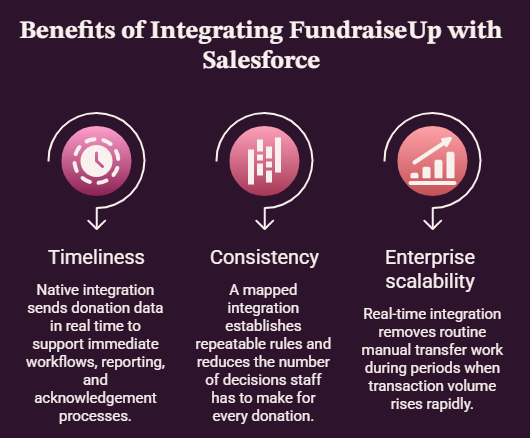
Timeliness
When donation information arrives in the CRM right after the gift, teams can act while the supporter’s interaction is still relevant. FundraiseUp says its native integration sends donation data in real time, which can support immediate workflows, reporting, and acknowledgement processes.
Consistency
Manual CSV exports and re-keying create opportunities for missing fields, mismatched campaign information, and duplicated contacts. A mapped integration establishes repeatable rules and reduces the number of decisions staff has to make for every donation.
Enterprise scalability
During a major appeal, year-end campaign, or peer-to-peer event, transaction volume can rise rapidly. A real-time integration can remove routine manual transfer work, although organisations can still need to monitor data quality, API capacity, and exception handling.
Best Practices for FundraiseUp Salesforce Integration
The best Practice for FundraiseUp Salesforce Integration is to design the data model always before connecting accounts. It supports audit readiness during compliance reviews, destination, documentation of the source, owner, and purpose of every important field. This makes mapping decisions defensible and also helps to prevent the integration from becoming a collection of undocumented exceptions.
Secondly, test with realistic records. Use examples covering new donors, existing donors, refunds, recurring gifts, multiple currencies, unusual supporter data, and campaign attribution. A successful connection can be wrong if matching or even mapping behaves differently.
Also, protect data quality at the CRM level. FundraiseUp always notes that duplicate handling is managed through Salesforce’s matching and duplicate-rule configuration rather than automatically. It also removes duplicates before synchronisation. Review those rules before enabling live transfers.
Moreover, monitor high-volume periods. FundraiseUp manages Salesforce API daily call limits through automated request throttling and an exception retry queue. During high-volume campaigns, admins should monitor system API consumption in Salesforce Setup under Concurrent API Requests.
For large campaigns, teams should understand their limits and should focus on the escalation process before the busiest fundraising period arrives.
What Should Organisations Check Before Going Live?
Before the activation of production, validate the connector, mappings, permissions, matching rules, and also the required objects. A mature FundraiseUp Salesforce Integration should support this validation and then run a controlled test and reconcile the number of source donations against the number of CRM records created or updated.
For organisations that are planning a FundraiseUp Salesforce Integration, the strongest approach is to start with the donor journey, then translate that journey into fields, objects, matching rules, automations, and reporting. ProvidusCRM can help nonprofits approach the implementation as a structured CRM project, with data quality, attention to configuration, and long-term maintainability. So, if you are looking for the solution, just connect with us.
Conclusion
A successful integration connects more than two platforms. It eventually connects the moment a supporter gives the information that the fundraising teams need to understand, recognise, and steward that relationship.
With real-time synchronisation, native nonprofit records, configurable mappings, and expanding support for external donations, the FundraiseUp and Nonprofit Cloud combination can provide a practical foundation for connected fundraising operations.
Frequently Asked Questions
1. Is FundraiseUp compatible with Salesforce Nonprofit Cloud?
Yes. FundraiseUp provides a dedicated integration for Salesforce Agentforce for Nonprofits, formerly known as Nonprofit Cloud.
2. Does FundraiseUp sync donations to Salesforce in real time?
Yes. FundraiseUp documents real-time synchronisation for its Agentforce for Nonprofits integration, but only after the automatic sync has been enabled and configured.
3. Can recurring donations be managed through the integration?
Yes, the integration supports gift transactions and gift commitments, and it also allows recurring fundraising activity to be represented using the nonprofit platform’s relevant records.
4. Can external Salesforce donations be imported into FundraiseUp?
Yes. FundraiseUp added this capability in July 2026. The import uses Gift Transaction records and requires the Gift Commitment object to be installed.
5. How should nonprofits prepare for the integration?
Begin with the data model, required fields, matching rules, campaign structure, and reporting requirements. After this, configure mappings, test representative records, and activate automatic synchronisation only after validation.
6. Can ProvidusCRM help with the implementation?
Yes. ProvidusCRM can support nonprofits with Salesforce-focused implementation configuration, planning, data quality, and integration work.
